1.8 Permissions and Security
Granting agents appropriate permissions so that they can independently perform actions is key to unlocking flows where agents autonomously complete larger pieces of work. This section teaches you the principles and techniques to safely and confidently configure permissions for your coding tool.
Why Permissions Matter
Giving agents permissions to run the same sorts of commands that a developer would run produces better results and expands the type of work that agents can complete, beyond just code generation.
For example:
- Validating their work by running tests or running and interacting with the application. This helps ensure the work you review at the end is correct and eliminates hallucinated claims such as that a bug was fixed when it definitely was not
- Completing development tasks like completing DB migrations or creating commits, which are required to enable E2E task completion
The solution however is not to simply grant agents broad permissions to execute any action. There are risks with granting too much access, but there are techniques to manage the risks, just as there are when managing permissions for humans
Appropriately Configuring Permissions
There are risks with granting too many and too few permissions to your agents, so you need to identify a sweet spot that best manages these risks
- Granting too few permissions will cause an inundation of permission prompts. This can become overwhelming and cause Approval Fatigue where all requests are approved reflexively without proper consideration. Actions that should be reviewed are lost amongst frequent actions that should be allowed, and destructive actions are inadvertently approved
- Granting too many permissions allows the agent to perform destructive actions like deleting a production database and increases the risk of security incidents, like exposed secrets. LLMs are non-deterministic and susceptible to prompt injection attacks, so prompting the agent to avoid these sorts of actions is not a sufficient strategy
- Granting an appropriate level of permissions ensures that permission prompts are primarily those that truly require human review and that no destructive actions are inadvertently taken
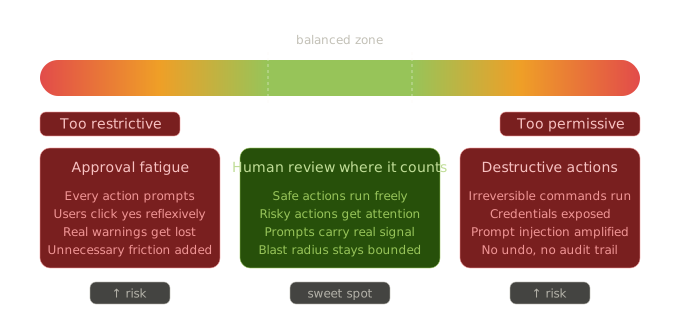
There is no single "correct" way to configure permissions. Every configuration decision has tradeoffs in terms of risk, friction, and capability. It's more important that these tradeoffs are made deliberately than that the system is as secure as possible.
Principles of Agent Permissions
The AI tooling space changes quickly, so specific configurations and approaches may be quickly irrelevant. The following are principles that apply regardless of how exactly permissions are configured.
- Prefer Deterministic Permissions: When possible, prefer permissioning approaches that deterministically define what actions an agent can or cannot take. LLMs are non-deterministic and susceptible to prompt injection attacks, so prompt-based permission definitions can be bypassed if the context becomes diluted or contains an adversarial instruction
- Principle of Least Access: Grant agents the smallest set of permissions that they need to perform their task. This principle is often applied to human users, but applies to agents for the same reason: it helps prevent destructive actions from being performed, especially accidentally or by malicious actors that gain access to a system
- Defense in Depth: For critical security risks, don't rely on a single security control to enforce a policy. For example, if you have a method to prevent an agent from reading secrets, you should also have a method to prevent exfiltration in case a secret is somehow read
- Isolation and Reversibility: Identify strategies to isolate the changes that agents make from production systems and from other agents, as well as to make changes reversible. This makes it safe to grant broader permissions. Common industry tools already allow this but their value increases in this context. For example, version control (i.e. git), git worktrees, containers, and ephemeral service instances
Exploratory Starting Point: Auto Mode
Claude Code's auto mode automatically classifies whether commands are safe, reducing or eliminating permission prompts. If you haven't granted Claude permissions to run commands as it works, it can be a good place to start to get a sense for what it can do when given more autonomy.
Auto mode uses an LLM to classify whether commands are safe to run, meaning permissioning is
non-deterministic and could result in destructive or unexpected actions. For example, the
defaults allow Claude to read secrets from .env files. Treat auto mode as a way to explore agent
autonomy in low-stakes environments, not as a substitute for explicit, deterministic permission
configuration on real projects.
Configuring Permissions in Claude Code
As you're configuring permissions, start restrictive and gradually grant permissions as Claude requests to perform actions that you feel are safe. This ensures that the Principle of Least Access is applied, since it's much more difficult to start permissive and reduce permissions.
See Claude Code Documentation for more information.
1. Accept Edits Mode
By default, Claude Code starts in a mode that requires approval to make changes to files in your
repository. Enable acceptEdits mode to allow Claude to autonomously make changes to files, and run
commands to create, copy, or move files within the repository.
Version control systems like Git help isolate these changes and make them reversible. Structured workflows like SDD help in producing a plan that allows agents to use this mode effectively. Identifying an appropriate scope of work and aligning on the approach before making changes ensures that it's feasible to review the larger set of changes produced at the end.
2. Allowing Commands
You can grant Claude permissions to run bash commands without a permission prompt. Permission
prompts typically provide an option to add some form of the command to the allow list, and you
can use the /permission command or edit Claude settings files to configure the commands allowed.
The allow list can include glob patterns with * to allow a set of commands matching the provided
pattern. For example, git commit * allows Claude to execute git commit with any flags or options.
Using a glob in the allowlist is very permissive, allowing Claude to run the command with any
arguments or flags. For example, npm run * allows Claude to run any script defined in
package.json, but if Claude can edit that file, it effectively allows Claude to run arbitrary
commands. Make sure you understand all forms of the command you are allowing, and prefer a more
specific list of allowed commands when possible.
Claude may execute the same command in different forms, or generate unusual one-off commands to log
data, which create a permission prompt for a command that would otherwise be approved. Update your
AGENTS.md or other prompts to explain the preferred command structure, to address this problem.
3. Deny/Ask Permission Configuration
In addition to a list of allowed commands, Claude allows you to configure commands that are automatically denied or that always require approval from the user. This allows for more fine-grained permission control, as well as a method to eliminate permission prompts for commands you would always reject.
From the Claude Code Documentation:
Rules are evaluated in order: deny -> ask -> allow. The first matching rule wins, so deny rules always take precedence.
For example, you could allow git push *, but deny git push --force * to better control
how agents are allowed to push changes.
4. Custom Hooks
Hooks are user-defined shell commands that execute at specific points in the Claude Code lifecycle.
In the context of security, PreToolUse hooks are the most relevant — they intercept bash commands
before execution and can make an deny/ask/allow decision with a reason for the agent to read.
Although not strictly part of Claude's permissioning system, custom hooks provide a more granular way to control permissions than wildcards and deny/ask/allow lists can provide. You could, for example, write a script that only allows force pushing to feature branches, something that may be difficult to do with wildcards alone.
For complete information on PreToolUse hooks, see the
Claude Code Hooks documentation
Secret Management
Agents introduce a new vector for secret exfiltration, which makes standard secret-management practices more important and requires new techniques for managing secrets during development.
Developer machines typically contain secrets in plain text that are used during development. The assumption was that if a malicious actor gained access to the filesystem to steal these secrets, there were far more serious security issues at play. However, the introduction of AI agents introduces dozens of ways that sensitive information can be exfiltrated from a machine, especially via prompt injection.
The Lethal Trifecta provides a model for understanding and preventing these issues. If an agent has access to sensitive information, exposure to untrusted content, and the ability to communicate externally, then the untrusted content can instruct the agent to externally communicate the sensitive information to a malicious actor.
The following sections provide techniques for addressing each component of the lethal trifecta
1. Limit Agent Access to Secrets
Minimize opportunities for agents to access plaintext secrets in the first place
- Use local secret management tools that let you avoid storing plaintext secrets in
.envfiles, which an agent can read. Tools like Infisical or Varlock are examples that you might use as a starting point - Configure permissions so that the agent cannot run commands or read files that expose secrets
- Use sandboxing for OS-level enforcement that prevents agents from reading secrets
There are limits to restricting access to secrets in the context of AI coding agents. If the agent is running an application that uses a secret, it could simply modify the code to log the secret, even if the secret were protected otherwise.
2. Controlling External Communication
Prevent an agent from exfiltrating a secret if it does gain access to one
- Configure permissions so that agents can only autonomously make external requests to trusted sources, and other requests are reviewed by a human
- Use sandboxing for OS-level enforcement that prevents agents from communicating with untrusted external sources
3. Using Trusted Sources
Prevent an agent from receiving adversarial instructions that could trigger it to exfiltrate a secret. Prefer granting agents access to trusted sources of information that are unlikely to contain adversarial instructions
This is the most difficult to control and review since even trusted sources may contain adversarial instructions, and the volume of content that agents consume makes thorough review impossible.
Sandboxing
Sandboxing is complementary to permissioning, providing OS-level enforcement that isolates the agent from the filesystem and the network. Sandboxing policies are relatively coarse, while permissions are often more granular
See Claude Code Documentation for more details.
Even if you believe your permissions are configured to prevent certain types of filesystem access or network requests, adding sandboxing provides Defense in Depth. That way, if a command that is otherwise allowed by permissions attempts unexpected access to the filesystem or the network, the command is disallowed.
Filesystem Isolation
By default, in sandbox mode, Claude will only have write access to the current working directory and all of its contents, whether that write is triggered by Claude directly or indirectly by a bash command that Claude uses. By default, Claude has read access to all files on the computer, with few exceptions.
If you wish to allow Claude to modify other files and directories while in the sandbox, you must add them to the sandboxing config. The same applies to files outside of the working directory that would be modified by commands that you expect Claude to use (e.g. package managers).
By default, sandboxing allows Claude to read directories that typically contain secrets, such as
~/.ssh/. You must add these sorts of directories to the sandboxing config to prevent Claude from
reading them.
Network Isolation
By default, in sandbox mode, Claude will not have permission to make any network requests, whether directly via its tools, or indirectly by a bash command that makes a network request.
Claude prompts for approval when a command needs access to a new domain. You can also set allowed domains in the sandboxing config. Network access can be controlled by a custom proxy, so you can enforce more granular policies beyond allowed domains.
Network isolation is primarily based on the hostname of the request. While this prevents agents from making network calls to unexpected servers, it still allows agents to take destructive actions against an allowed domain. Use permissions or a custom proxy to more narrowly control the actions that agents can take.